[Ubuntu]Android Studio安装
系统配置
参考:Linux
Android Studio要求Linux系统最低配置如下
GNOME or KDE desktop. Tested on Ubuntu® 14.04 LTS, Trusty Tahr (64-bit distribution capable of running 32-bit applications)64-bit distribution capable of running 32-bit applicationsGNU C Library (glibc) 2.19 or later3 GB RAM minimum, 8 GB RAM recommended; plus 1 GB for the Android Emulator2 GB of available disk space minimum, 4 GB Recommended (500 MB for IDE + 1.5 GB for Android SDK and emulator system image)1280 x 800 minimum screen resolution
需不需要安装JDK
参考:
Do I need Java JDK for using Android Studio?
安装Android Studio之前需不需要安装JDK
在AS官网的安装页面没有关于JDK的提示并且AS在内部集成了JDK
A copy of the latest OpenJDK comes bundled with Android Studio 2.2 and higher, and this is the JDK version we recommend you use for your Android projects. To use the bundled JDK, proceed as follows:
下载
下载地址:Android Studio
安装
参考:Linux
先安装依赖包
$ sudo apt-get install libc6:i386 libncurses5:i386 libstdc++6:i386 lib32z1 libbz2-1.0:i386
下载得到.zip文件
- 解压生成
android-studio文件夹 - 进入
android-sutdio/bin目录 - 执行
studio.sh文件:./studio.sh - 按照提示设置
代理设置
问题描述:Unable to access Android SDK add-on list
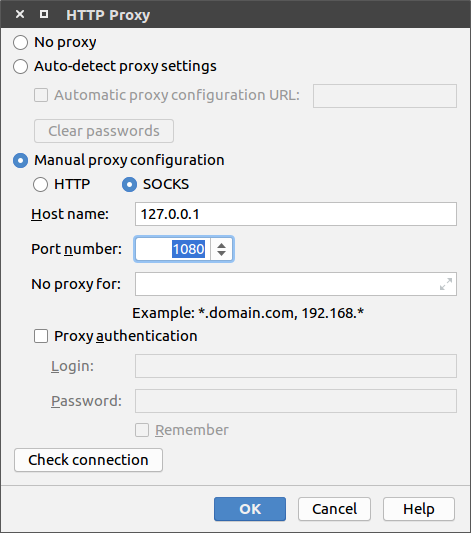
我设置了SSR,所以选择Setup Proxy->Manual proxy configuration
选择SOCKS,Host name输入127.0.0.1,Port number输入1080
也可以参考Unable to access Android SDK add-on list关闭代理设置